
DLSS vs FSR vs Native Resolution
Written by Gamingmuzz Team
Last updated: Saturday, October 17, 2026
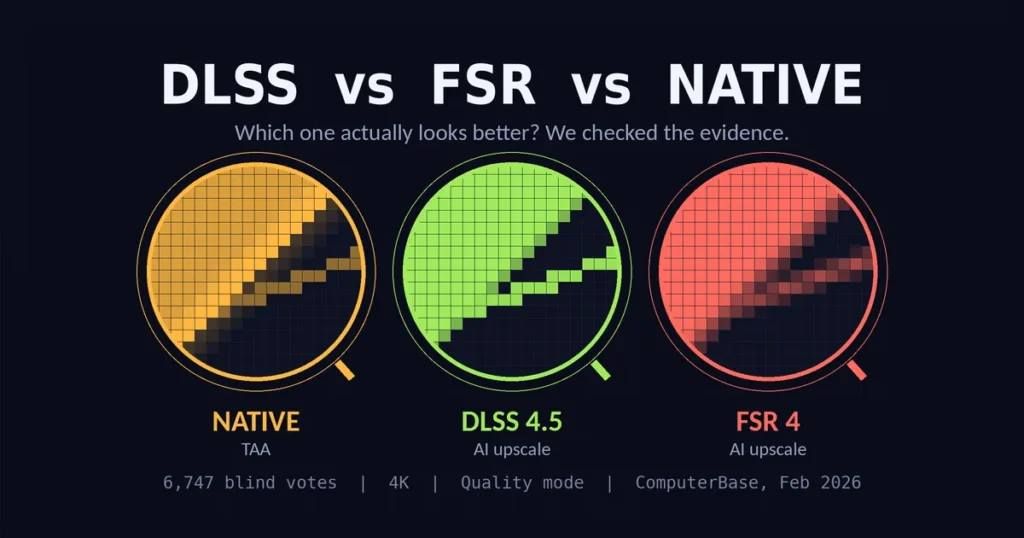
In a large blind test, DLSS 4.5 won 48.2% of 6,747 votes, while native rendering got 24.0%. If you’ve been arguing about DLSS vs FSR vs native resolution online, that result should sting a little.
That doesn’t mean native is dead, though. The better pick depends on your GPU, your screen, and what bothers you most: blur, shimmering, or graininess.
We checked official pages and the strongest independent tests, then condensed everything into recommendations you can use tonight. We didn’t run our own capture tests. Every claim here comes from official sources and the outlets named in the text.
Update note: Nvidia’s October DLSS 5 model update and AMD’s FSR Diamond are still new or pending, so we’ll revisit this once independent tests land.
Key takeaways
- In blind votes, DLSS 4.5 took 48.2%, while native with TAA got 24.0% and FSR 4 got 15.0%.
- Experts still favor DLSS 4.5 for sharpness, ghosting, and thin lines. FSR 4 is softer but sometimes less grainy.
- Native isn’t one thing. TAA blur can hurt it, and DLAA, the AI version of native, wasn’t in the vote.
- DLSS 5 is a lighting upgrade, not an upscale. It runs only on RTX 50 cards and carries a substantial performance cost.
- AMD added FSR 4.1 support for RX 7000 cards in June 2026, so Radeon owners now have additional choices.
Who wins in DLSS vs FSR vs native resolution?
DLSS 4.5 usually looks best, and FSR 4 sits close behind in some scenes. Native with TAA often looks softer than people expect. That’s the pattern across blind votes and expert comparisons as of October 17, 2026.
| Native (TAA) | DLSS 4.5 | FSR 4 | |
|---|---|---|---|
| Blind-vote share (six games, 4K, Quality mode) | 24.0% | 48.2% | 15.0% |
| Frame-rate gain vs. native TAA (Cyberpunk 2077, 4K performance) | Baseline | +128% | +179% |
| Look at expert tests. | Can blur in motion | Sharpest, least ghosting | Softer, often less grainy |
| Runs on | Any GPU | GeForce RTX cards | Radeon RX 9000, plus RX 7000 via FSR 4.1 |
Frame-rate figures come from TechSpot’s test with the Ultra ray tracing preset. It used an RTX 5070 Ti and an RX 9070 XT, so the cards differ.
My read: frame cost matters as much as appearance. Even so, DLSS 4.5 gives up some speed to FSR 4 but still wins the picture. GeForce owners can treat DLSS 4.5 at Quality as a reliable default.
6,747 votes put DLSS vs. FSR vs. native resolution to the test.
ComputerBase ran a reader blind test in February 2026. Readers watched unlabeled 4K clips from six games and picked the best-looking one. DLSS 4.5 and FSR 4 ran in Quality mode, while native used TAA.
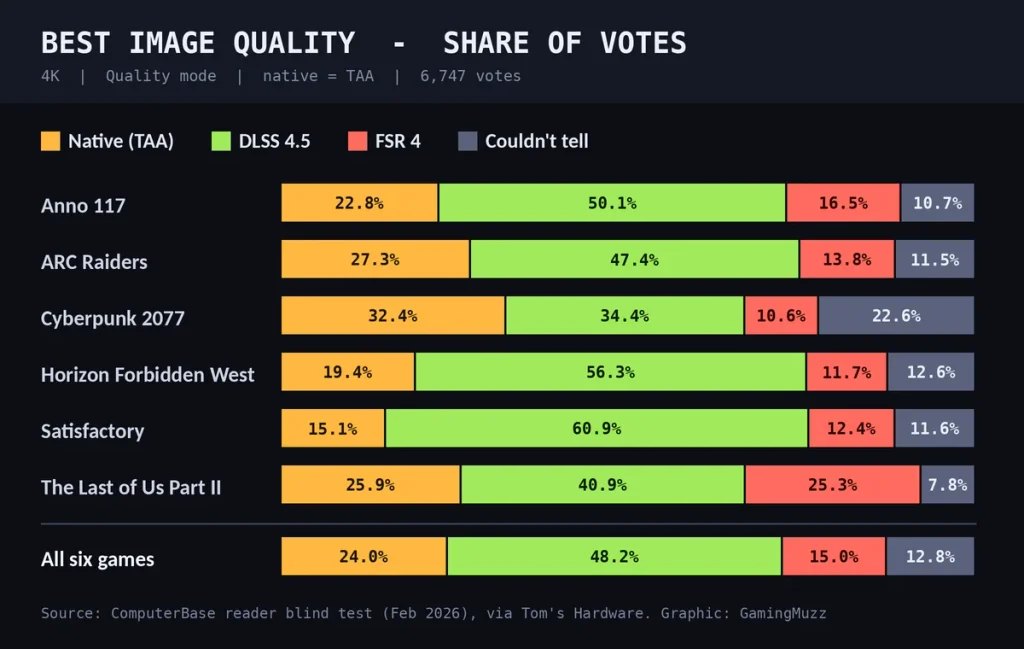
Share of votes for best image quality. Source: ComputerBase reader blind test, February 2026, via Tom’s Hardware. Graphic by GamingMuzz.
| Game | Native (TAA) | DLSS 4.5 | FSR 4 | Couldn’t tell |
|---|---|---|---|---|
| Anno 117 | 22.8% | 50.1% | 16.5% | 10.7% |
| ARC Raiders | 27.3% | 47.4% | 13.8% | 11.5% |
| Cyberpunk 2077 | 32.4% | 34.4% | 10.6% | 22.6% |
| Horizon Forbidden West | 19.4% | 56.3% | 11.7% | 12.6% |
| Satisfactory | 15.1% | 60.9% | 12.4% | 11.6% |
| The Last of Us Part II | 25.9% | 40.9% | 25.3% | 7.8% |
| All six games | 24.0% | 48.2% | 15.0% | 12.8% |
Every game went to DLSS 4.5, and Satisfactory was its biggest win at 60.9%. Cyberpunk 2077 was the closest comparison, with DLSS at 34.4% and native at 32.4%.
The vote has limits, though. It only shows which clip people called best, not who finished second. ComputerBase itself said you can’t conclude that FSR looks worse than native.
DLAA, Nvidia’s AI anti-aliasing at native resolution, wasn’t in the vote either. Tom’s Hardware argued it would likely beat any upscaled image.
A second ComputerBase test in April 2026 used seven games and added FSR 4.1. Of those, DLSS 4.5 won six, while FSR 4.1 took Resident Evil Requiem. Native wasn’t part of that round.
Native isn’t automatically sharp in DLSS vs. FSR vs. native resolution.
Most modern games ship with TAA, which blends past frames to hide jagged edges. It works reasonably well, but it can smear detail whenever the camera moves.
DLSS and FSR 4 replace that step with their own AI models. According to TechSpot, both avoid TAA blur, so clarity stays similar whether you stand still or move.
That’s why AI upscaling can win a blind vote. In many scenes, the model produces a clearer and more stable picture than the game’s own TAA.
Nvidia claims DLSS 4.5 in Performance mode can match or beat native, but that’s a company statement. In its Mafia: The Old Country grass test, TechSpot said DLSS 4.5 didn’t reach native-level quality.
My read: the fair native test is DLAA, or a game with strong built-in anti-aliasing. Native with weak TAA is a low bar.
Round by round: DLSS vs FSR vs native resolution up close
TechSpot’s February 4, 2026, test pitted both upscalers against each other at 4K performance and 1440p balanced. Think of it as the DLSS 4.5 vs. FSR 4 round, since native wasn’t in that bracket.
- Sharpness: DLSS 4.5 wins, because FSR 4 appears noticeably softer, and the gap shows on a 4K monitor in motion.
- Ghosting: DLSS 4.5 wins, while FSR 4 showed some of the worst trails in a Cyberpunk streetlight scene.
- Fences and thin lines: DLSS 4.5 wins clearly, and FSR 4 needs Quality mode to get near it.
- Foliage: DLSS 4.5 wins in most games, but FSR 4 stays steady by smearing branch detail.
- Stability: DLSS usually leads by one or two quality tiers, and shimmer is FSR 4’s weakest area.
- Disocclusion and hair: It’s a draw, since both trade blows depending on the game.
- Grain and pixelation: FSR 4 sometimes wins, because grass and snow in Horizon Zero Dawn looked cleaner on FSR.
One catch: render resolution still matters. TechSpot saw FSR 4 Quality look less grainy than DLSS 4.5 Performance in some scenes.
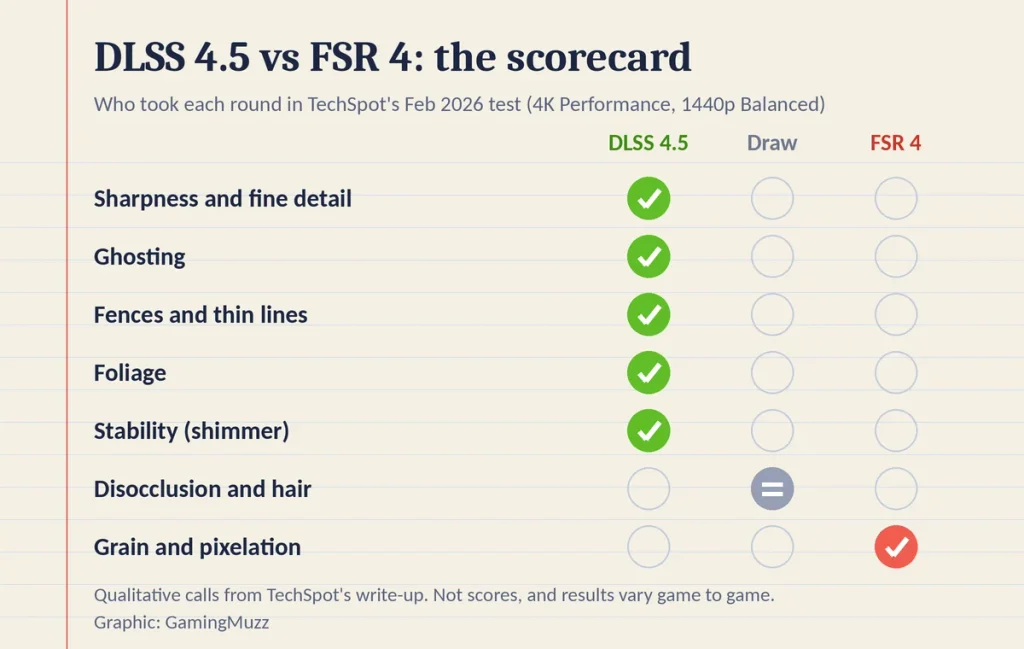
Category winners from TechSpot’s February 2026 comparison. Concept graphic by GamingMuzz.
Not every tester sees a significant gap, though. One XDA Developers comparison of DLSS 4.5 and FSR Redstone found the two nearly impossible to tell apart during play.
The better picture isn’t free, either. TechSpot measured DLSS 4.5 running half a tier to a full tier slower than FSR 4 on comparable cards. It also found DLSS pulls furthest ahead at low render resolution, like performance mode.
My read: the quality mode you choose matters as much as the brand.
DLSS 5 changes the DLSS vs. FSR vs. native resolution debate.
DLSS 5 isn’t an upscale. Nvidia calls it 3D-guided neural rendering, and it layers lighting and material detail over the engine’s frame.
It launched in early September 2026 in NBA 2K27 for GeForce RTX 50 cards and GeForce NOW. As of October 17, 2026, Nvidia’s DLSS hardware table lists RTX 50 only.
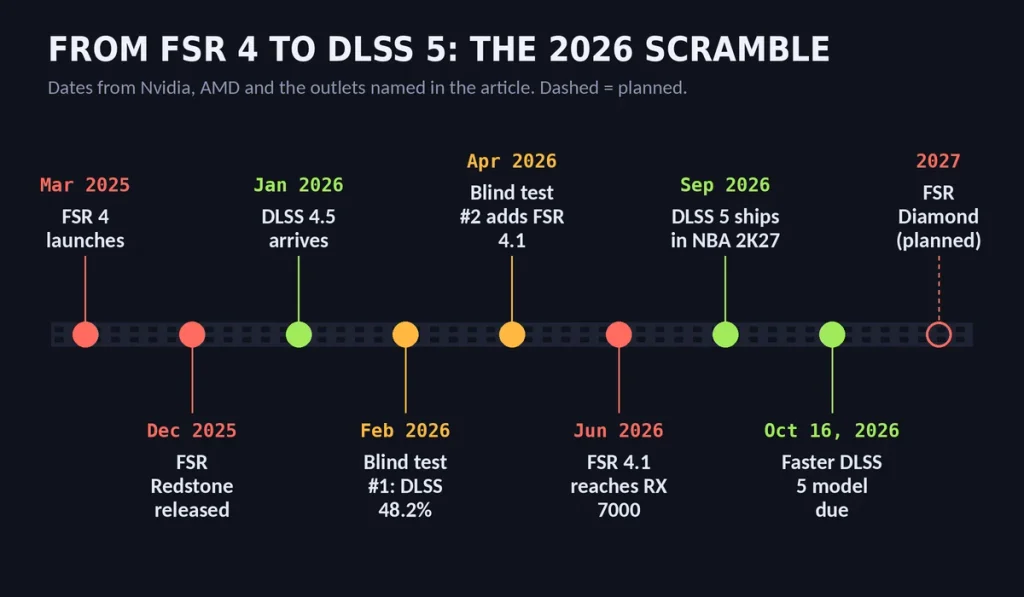
Key dates from Nvidia, AMD, and the outlets named in this article. Graphic by GamingMuzz.
Studios control how strong the effect becomes. Developers get masks, intensity sliders, and model-weight choices, according to Nvidia. That keeps the original art direction protected.
The cost is substantial, though. TechSpot measured NBA 2K27 on an RTX 5090 running 60% slower at 4K and 40% slower at 1440p. That compares DLSS 5 against DLAA at max settings.
Nvidia’s October model update promises half the GPU overhead of the September version, plus 20% less 4K VRAM use. It was scheduled for October 16, 2026, but we haven’t found independent tests of it yet.
AMD announced FSR Diamond in March 2026, covering ML upscaling, ML multi-frame generation, and neural rendering. One outlet reports a 2027 launch, and AMD brands today’s ML family as FSR Redstone.
Critics describe DLSS 5 as a filter over the artists’ work, while supporters describe it as a lighting upgrade. Early reviews land somewhere in between.
My read: DLSS 5 changes the question. Native versus upscaled was about fidelity, but now it’s about faithful versus enhanced, and that’s a matter of personal taste.
Your GPU decides: DLSS vs. FSR vs. native resolution picks.
My read: here’s where to start, as of October 17, 2026.
| Your GPU | Start with | Why |
|---|---|---|
| GeForce RTX 50 | DLSS 4.5 at Quality, or DLAA if frames allow | Best looks in tests. DLSS 5 stays optional because it’s heavy. |
| GeForce RTX 20 to 40 | DLSS 4.5, or DLSS 4 if artifacts bug you | TechSpot says reverting to DLSS 4 can help, and 4.5 costs more on older cards. |
| Radeon RX 9000 | FSR 4, quality mode if you can | Softer but clean. FSR 4 quality sometimes lines up with DLSS performance. |
| Radeon RX 7000 | FSR 4.1, where the game supports it | AMD added RX 7000 support in June 2026. |
| Any card with spare frames | Native with the best anti-aliasing the game offers | No upscaling artifacts, but weak TAA can look soft. |
Check the supported game list first. Reports of AMD’s official list put FSR 4 and Redstone support at about 415 games in October 2026. That’s 259 with built-in support and 156 added through the driver.
Here’s a quick two-minute comparison that works on any graphics card:
- Set your target resolution first.
- Choose Quality mode, then step down only if you need additional frames.
- Judge the image in motion, not on a paused frame.
- If your card supports it, try DLAA for a genuine native comparison.
Region note: GPU prices and stock vary by country, while DLSS 5 support depends on each game’s patch.
Rumors and leaks: what AMD might do next
Unconfirmed. Treat everything in this box as a rumor.
A hardware leaker called Kepler_L2 says AMD will ship DLSS 5-style neural lighting on next-gen GPUs. VideoCardz reported the claim. Separate reports say it would be limited to RDNA 5 cards, but AMD hasn’t confirmed either point.
How I checked this
Facts come from official pages first: Nvidia’s DLSS pages and developer blog, plus AMD’s GPUOpen FSR page. Test results come from TechSpot, ComputerBase (via Tom’s Hardware and TechPowerUp coverage), and XDA Developers.
Key facts were received from two independent sources where possible. TechSpot’s category findings come from one outlet, so we cross-checked the overall verdict against the vote results. Rumors sit in their own box, and when sources disagreed, we left the claim out.
FAQ
Can I use DLSS on a Radeon card, or FSR 4 on GeForce?
No to both for the AI versions. DLSS needs a GeForce RTX card, and XDA Developers says FSR 4 can’t run on Nvidia hardware.
Does native always look best?
No. Native with TAA can blur in motion, and DLSS 4.5 beat it in all six ComputerBase games. DLAA is the better native test.
Is DLSS 4.5 Performance mode as good as native?
According to Nvidia, it can be. TechSpot found it varies by scene, with fine grass still a weak spot.
Do I need DLSS 5 for the best picture?
No. It changes lighting and materials, runs only on RTX 50 cards, and carries a substantial performance cost. DLSS 4.5 handles the upscaling.
Final word
So, DLSS vs FSR vs native resolution? DLSS 4.5 wins the picture, and FSR 4 is a softer but solid fallback.
Native with TAA isn’t the automatic safe choice anymore. Choose your quality mode first, then your brand, and judge the result in motion.